Connect an OAuth-protected MCP server
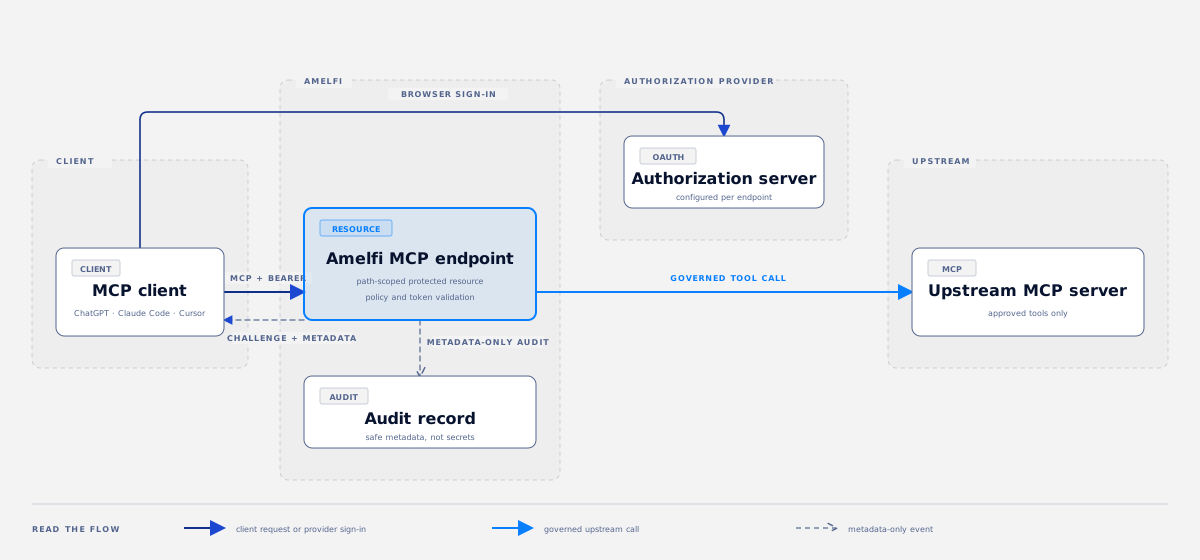
This guide takes you from a published MCP endpoint to one governed tool call. It works with ChatGPT, Claude Code, Cursor, and other compatible MCP clients. The client must support the server’s OAuth registration method.
The endpoint URL is the connection value. The operator’s upstream client secret is not.
What you need
Section titled “What you need”- A published, path-scoped MCP endpoint from the catalog connect configuration. It has the form
https://gateway.example.com/tenants/<tenant>/environments/<environment>/servers/<server>/mcp. - A test user at the endpoint’s authorization provider with the required scopes.
- One approved, read-only tool that is safe to call during a demo.
- Access to the Amelfi console audit view if you will verify the call yourself.
The operator completes endpoint setup once. Every client then connects with its own OAuth client identity. A compatible client can use pre-registration, a Client ID Metadata Document, Dynamic Client Registration, or manual client configuration, depending on what the authorization server supports.
1. Publish the endpoint
Section titled “1. Publish the endpoint”Use /activate in the Amelfi console to prepare a new server. Work through endpoint discovery, credential connection, access policy, publishing, and the test call. Publish only after the endpoint binding is active and the approved tool list is correct.
For an existing server, confirm these details before sharing the URL:
- The endpoint auth binding is active.
- The authorization provider, audience, and minimum scopes are correct.
- The server is available in the target environment.
- Policy allows the test user to discover and call the selected tool.
The console login and the MCP login can use different identity providers. The browser sign-in started by an MCP client must open the authorization provider configured for that MCP endpoint.
2. Add the endpoint to your client
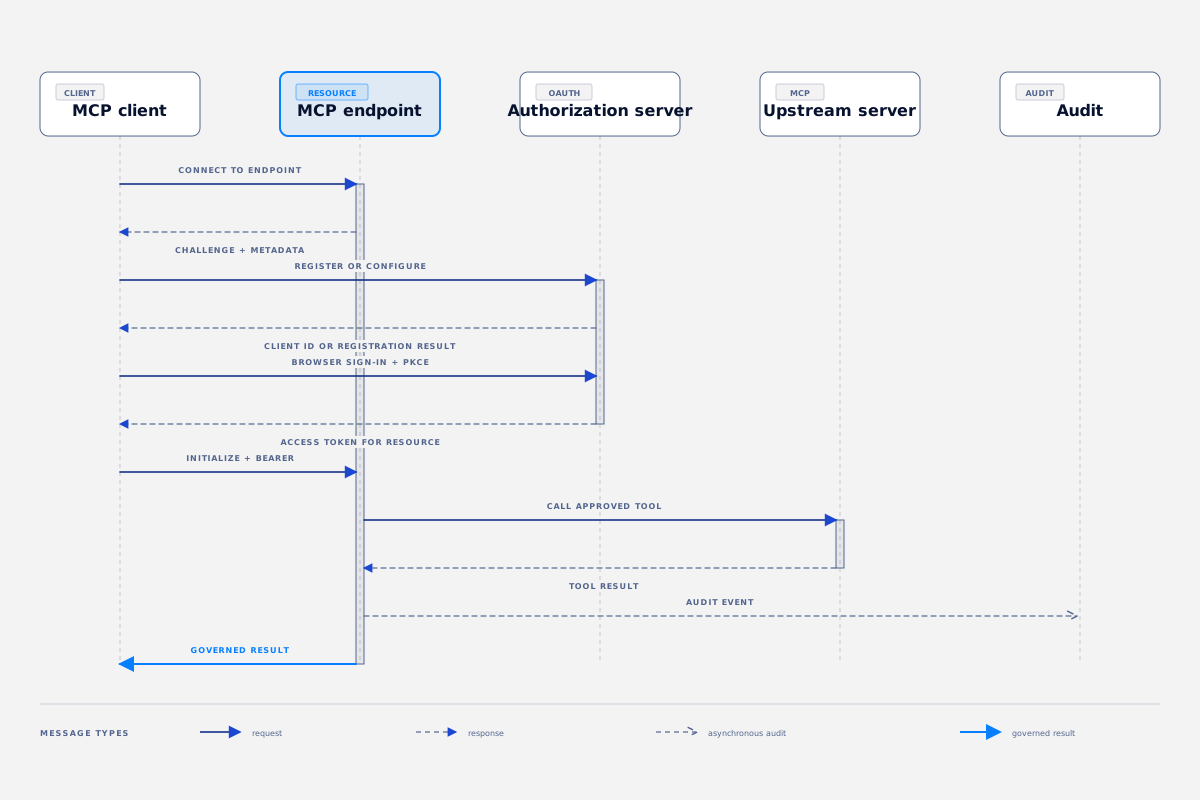
Section titled “2. Add the endpoint to your client”Open your client’s Add connector or Add MCP server screen. Paste the canonical endpoint URL exactly as it appears in the catalog connect configuration.
Do not use the hostname alone. The tenant, environment, and server path identify the protected resource and its OAuth configuration.
When the client first contacts the endpoint without a token, the endpoint returns an OAuth Bearer challenge. The challenge points the client to path-specific protected-resource metadata. That metadata names the authorization server and the supported scopes.
3. Sign in
Section titled “3. Sign in”Choose Connect when your client asks you to authenticate. It opens the configured authorization provider in your browser.
Sign in with the test user. Approve the requested scope if the provider asks for consent. The client returns to its connection flow after authorization and receives an access token for the canonical endpoint resource.
If the browser opens the Amelfi admin console instead of returning to the MCP client, return to the client and start the connection from the endpoint there. The console and endpoint may share an identity provider; confirm the endpoint binding when the provider is unexpected.
4. Prove the connection with a safe tool
Section titled “4. Prove the connection with a safe tool”Ask the client to list tools. You should see only the tools that policy permits.
Then call one read-only tool. Start with a tool that returns non-sensitive test data. For example:
List the available moderation options. Return a concise result and the request ID.Avoid tools that return customer records, order details, payment data, or other live personal information during a walkthrough.
5. Verify the governed call
Section titled “5. Verify the governed call”In Amelfi, open the server and then its audit view. Find the request by its request ID, tool name, actor, or time.
The event should show an allowed policy decision, the OAuth client context, the upstream outcome, and the request ID. By default, audit records contain safe metadata without raw tool arguments. Access tokens and upstream client secrets must never appear in audit records.
6. Test revocation
Section titled “6. Test revocation”To prove that access is enforced, revoke the test principal or disable its relevant binding in the admin console. Retry the same tool call from the MCP client.
The retry should be denied before the upstream call. Find that deny event in audit. Restore the test user’s access after the demonstration.
Troubleshooting
Section titled “Troubleshooting”| What you see | What to check |
|---|---|
| The client has no login option | Confirm the exact path-scoped URL. Check the Bearer challenge and protected-resource metadata. |
| The browser opens the wrong sign-in page | Check the endpoint auth binding. The endpoint’s authorization server controls the client login. |
| Login succeeds but no tools appear | Check the user’s scopes, policy, server approval, and endpoint binding state. |
insufficient_scope or an audience error | Check the canonical resource URI, configured audience, and scope grant at the authorization provider. |
| A write tool is rejected | Start with a read-only tool. Some upstream services require an idempotency key for write operations. |
| A call is denied after access changed | This is expected. Inspect the audit record to confirm which identity, policy, scope, or revocation check stopped the call. |
- Read Your first governed tool call for catalog and audit basics.
- Read Search the audit trail to investigate a request in detail.
- Read Create a credential binding when the upstream service needs an operator-managed credential.
- See the Admin API reference for Consumer OAuth endpoint, diagnostics, binding, and revocation operations.
Amelfi documentation · Space Grotesk / Geist Mono